
Nomorobo Basic Robocall Block
Telephone Science CorpCommunication
3.61.64K Reviews
- Version
- Varies With Device
- Installs
- 100.00K
- Age Rating
- Everyone
Screenshots
Our Review of Nomorobo Basic Robocall Block
 Analysis by Appyee
When every pause in the day is interrupted by an unknown caller, even checking your phone starts to feel like work. I know the weary glance at the screen: should I answer, let it ring, or risk missing something important? Nomorobo Basic Robocall Block is built for that small but constant decision. It aims to reduce unwanted calls so your phone can feel more like a way to reach people and less like a doorbell anyone can ring.
That distinction matters most when you rely on calls for real things: a family member who may need help, a delivery, a doctor’s office, or a callback about work. I wouldn’t expect any caller filter to make every unknown number harmless or every wanted call obvious. The useful promise here is more modest: make robocall interruptions less central to the day, while keeping your own judgement in charge.
Where a call blocker fits into daily life
Nomorobo is a communication app from Telephone Science Corp, and its focus is narrow: identifying unwanted automated and nuisance calls. That narrowness is part of its appeal. It is not trying to replace texting, your contacts, or the phone app itself; it is meant to help with the noisy edge of ordinary calling.
I can see it fitting especially well for someone who receives repeated sales calls, gets frequent scam attempts, or has started silencing every unknown number just to get some peace. That last habit can create its own problem: legitimate callers may not be saved in your contacts. A blocker offers another approach, though I’d still keep an eye on missed calls and voicemail rather than treating filtering as a guarantee.
A realistic example is a parent waiting for a call from school while trying to get through a workday. A stream of nuisance calls makes it harder to notice the one call that matters. A filter may reduce some of that background noise, but I’d still check the call log and voicemail during a quiet moment. That simple routine keeps the tool from becoming a reason to assume every unfamiliar number has been handled perfectly.
What changes in the conversation flow
The practical benefit is not only fewer interruptions; it is having more control over when you give an unknown caller your attention. Instead of reacting to each ring, you can decide when to review calls and return the ones that seem relevant. For people who feel pressured to answer every number, that change in rhythm can be more valuable than any single blocked call.
Nomorobo Basic is the free offering, while the app also lists in-app purchases priced from $2.99 to $49.99 per item. I’d check what a particular purchase includes before paying, and I wouldn’t assume the basic option has every capability someone might want. Its audience rating is 3.8 from around 2,600 ratings, alongside about 1,600 written reviews; I’d read recent feedback for clues about how it behaves on a device like mine rather than treating the score as a promise.
Compared with relying only on a phone’s built-in silence-unknown-callers setting, a dedicated blocker is appealing if you want help distinguishing likely nuisance calls from calls you may want to inspect. The built-in setting can be simpler if your priority is quiet above all else, but it may send unfamiliar callers out of sight too. A carrier’s call-filtering option may suit someone who prefers to keep everything within an existing phone service. I’d choose based on whether I want fewer rings, more control over unknown numbers, or the least extra setup.
Attention, expectations, and sensible limits
There is a useful trade-off in any call filter: the more you depend on it, the easier it is to stop checking what happened. I’d make a habit of reviewing missed calls after important waiting periods, such as when I expect a clinic or a school to call. If a number looks relevant, I can return it through a channel I trust instead of assuming the filter has made the decision for me.
It also helps to think about how other people reach you. If clients, service workers, or relatives often call from numbers you have not saved, a strict silence-first routine may not suit your life. Save important contacts when you can, and keep voicemail available as a second chance for callers to explain why they rang. A blocker works best as a layer of help, not as a substitute for a contact list or common sense.
The app is rated for Everyone, is free to install, and has been available since October 26, 2017. It has passed 100,000 installs, which suggests it has found an audience among people looking for a focused way to deal with nuisance calls. I’d still judge it by whether it improves my own call routine: fewer needless interruptions are useful, but a filter is only worth keeping if it doesn’t make important communication harder.
Who should try it—and who might prefer another route
I’d recommend giving it a look if robocalls are frequent enough to make you screen every ring, or if interruptions are breaking your concentration during work, caregiving, or study. It may also help someone who wants a dedicated tool rather than changing several phone settings and hoping they cover the same ground. The developer is Telephone Science Corp, and the app sits squarely in communication rather than trying to be an all-purpose security suite.
On the other hand, if you receive very few unwanted calls, a built-in phone setting may be enough and easier to manage. If you cannot risk overlooking unfamiliar callers, such as when arranging urgent repairs or waiting for a new healthcare provider, I would not rely on any blocker alone. Keep checking voicemail, and consider temporarily adjusting how you handle unknown calls while you are expecting one.
One practical tip is to set expectations with people who might call from a new number: ask them to leave a message or follow up by text when appropriate. That does not make filtering foolproof, but it gives important callers another route to reach you. Another is to review the call history on a regular schedule instead of checking it after every ring; that creates a calmer boundary without turning the app into something you have to monitor constantly.
Getting Started with Nomorobo
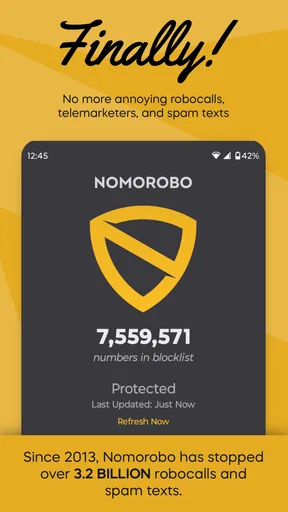
The setup for Nomorobo Basic Robocall Block is surprisingly simple. I downloaded it from the app store, and within a few taps, I was ready to kiss those pesky robocalls goodbye. It’s available on both Android and iOS, so no one’s left out of the party.
Once installed, the app seamlessly integrates into your phone’s call system. It’s almost like having a personal assistant who’s always on the lookout for unwanted calls. The interface is super user-friendly, which is a huge plus for those of us who aren’t exactly tech wizards.
The Magic Behind the App
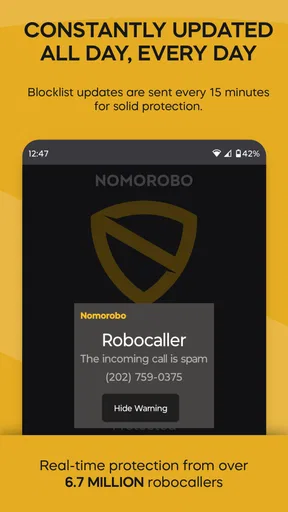
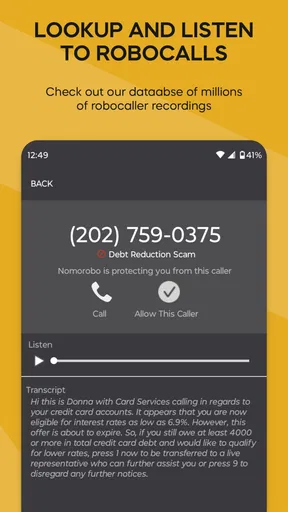
So, what’s the secret sauce? Nomorobo uses a massive database to identify and block robocalls. It’s constantly updated, which means it gets smarter every day. I was actually quite impressed by how efficiently it filtered out the junk calls without interfering with the important ones.
One cool feature is the ability to report calls that slip through the cracks. This helps improve the database and gives you a little sense of satisfaction knowing you’re contributing to the robocall apocalypse.
User Experience
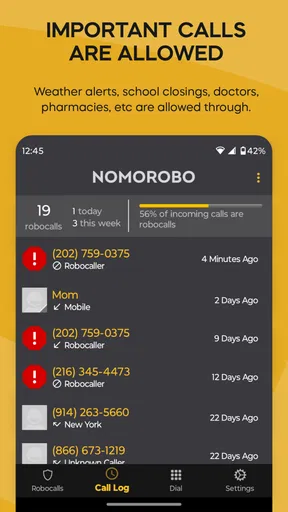
Using the app has been a breeze. There’s a satisfying little notification every time a robocall gets blocked, and I’ve noticed a significant drop in my call log clutter. It’s almost like the app is giving me a virtual high-five every time it does its job.
Another thing I love is how unobtrusive it is. It runs quietly in the background, letting me focus on more important things than dodging calls about car warranties I don’t even have.
Why It Stands Out
Now, there are a few robocall blockers out there, but what makes Nomorobo shine is its simplicity and effectiveness. It’s not weighed down by unnecessary features; it does one thing and does it well. Plus, it’s free, which is always a win in my book!
Also, it respects your privacy. In a world where apps can be a bit too nosy, it’s nice to have one that focuses solely on protecting you from robocalls without digging into your personal info.
Final Thoughts
If you’re like me and have been longing for a life free from robocall interruptions, give Nomorobo Basic Robocall Block a shot. It’s like having a little bouncer for your phone, ensuring only the calls you want get through. Trust me, you’ll wonder how you ever lived without it!
So, go ahead, download it, set it up, and enjoy the sweet silence of a robocall-free life. You can thank me later!
Verdict
Strengths of Nomorobo Basic Robocall Block
- Effectively blocks most robocalls.
- Easy-to-use interface for all users.
- Minimal battery consumption.
- Regular updates with new features.
- No need for complicated setup.
Limitations of Nomorobo Basic Robocall Block
- Limited features in the free version.
- Requires stable internet connection.
- Occasional missed spam calls.
- Some legitimate calls may be blocked.
- Limited support for international numbers.
Other Releases by Telephone Science Corp
View All
Nomorobo Max
Communication4.1
Similar Picks in This Category
View All
Google Messages
Google LLC4.6

Gmail
Google LLC4.1

Google Meet
Google LLC4.4

Google Chrome
Google LLC4.1

WhatsApp Messenger
WhatsApp LLC4.6

Carrier Services
Google LLC4.2
Frequently Asked Questions
What features does Nomorobo Basic offer to block robocalls?
Nomorobo Basic provides users with essential features to block unwanted robocalls. It includes automatic identification and blocking of known robocallers, a real-time database of spam numbers, and customizable settings to allow or block specific calls. The app aims to reduce interruptions from telemarketers and scammers effectively.
How does Nomorobo Basic work on Android and iOS devices?
Nomorobo Basic uses advanced algorithms and a constantly updated spam call database to detect and block robocalls. On both Android and iOS, it integrates with your phone's system to identify unwanted calls before they reach you. Users can adjust settings to fine-tune how the app handles calls.
Is Nomorobo Basic free to use, and are there any in-app purchases?
Nomorobo Basic offers a free version with essential features to block robocalls. However, there may be optional in-app purchases or subscription options for enhanced features. Users should check the app store listing for detailed pricing information and available premium features.
Does Nomorobo Basic affect normal call quality or phone performance?
Nomorobo Basic is designed to run efficiently in the background without affecting your phone's call quality or overall performance. The app focuses solely on identifying and blocking spam calls, ensuring that regular calls are processed normally and without delay.
Can Nomorobo Basic block text message spam as well?
The primary function of Nomorobo Basic is to block robocalls. While some versions may offer limited protection against spam texts, the app is specifically optimized for call blocking. Users seeking comprehensive text message spam protection might need to consider additional solutions.
